On my way home, I count the bird calls on my abacus Every chirp and tweet carves your silence
You extend your branches in welcome To the fall of night’s black canvas, your limbs want to toss away the stars
As you turn on to the path of your Autumn years, I know Dusk isn’t dusky, the red pine has a keen red heart
Lin Yu is a poet from Guangxing in Lugu, Nantou. He was born in 1957 and after a career working in journalism and editing, he returned to his hometown to run a tea shop.
At the beginning of spring, the rain slouches The sun is sluggish, like a wound that has scabbed in deep winter The dreamscape sways back and forth with the splish-splashing I see my childhood years riding on an ox back, walking towards me from the water
Zhan Che (詹澈 (Chan Chao-li) is a Taiwanese poet from Changhua. He has worked on various poetry journals and magazines, including founding Grassroots, and has long campaigned for local farmers’ rights.
Recently the Taiwanese authorities have been quite strict with parcels in and out of the country and if you’re using a courier like DHL, you might have recently been sent an email instructing you to fill in a form to let the company deal with import/export procedure for you. They normally link to the EZ Way app (Android / Apple). It looks like the EZ Way App has now started accepting foreign residents into its real-name authentication scheme.
Signing Up
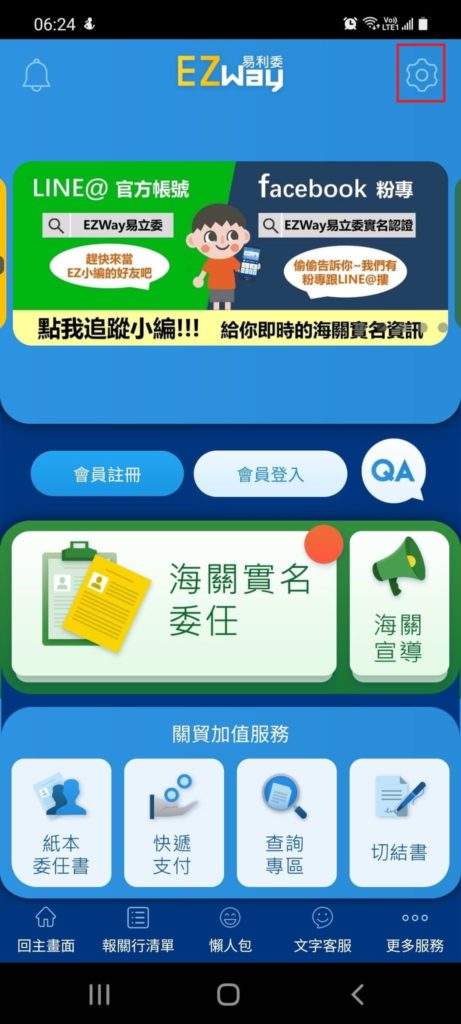
To change the settings to English (if you haven’t already), go to the cog in the upper right corner:
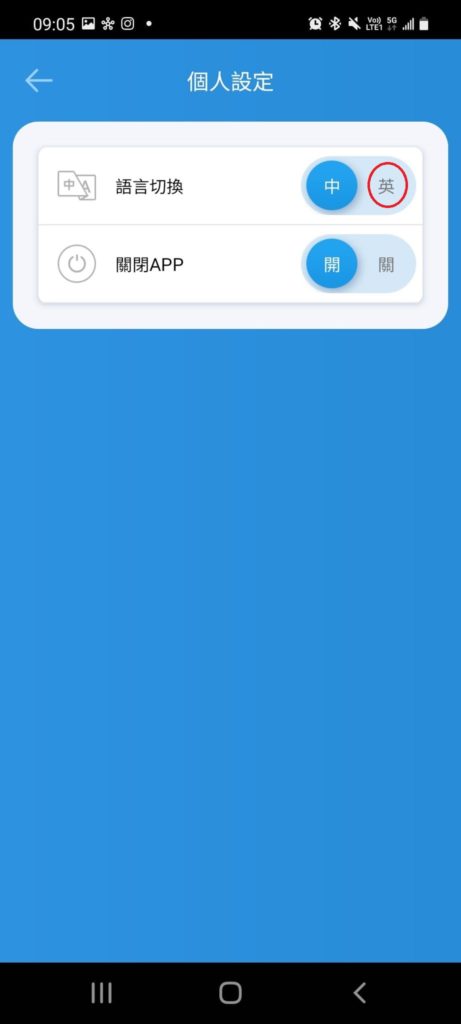
Then toggle 「語言切換」 (switch language) to 「英」 (English):
People protesting on the morning of President Tsai’s 2nd inauguration. The sign has the not-so-catchy slogan you’d expect from someone who still doesn’t believe that Tsai has a doctorate:「妳有沒有羞恥心 當總統 沒有博士 真騙子」 ‘Don’t you have any shame? Being president without a doctorate, what a cheat’:
I’ve seen an increasing amount of very frustrated people on Facebook groups asking for help on a common compatibility error with the e-filing system for alien taxpayers:
You’ve probably tried a billion things to remedy this error, but on this count, I have to give credit to the designers, who try to notify you of how to solve the problem (well, they could have just avoided the problem but hey, programming is hard):
Do you want your Alien Citizen Digital Certificate to hold all your receipts online so you don’t have to check them every two months (except the old ones that change colour every two months)? You can also get your winnings from the receipt lottery deposited directly in your bank account.
If you don’t have an Alien Citizen Digital Certificate yet, you can find out how to apply for one here. If you don’t want one, you can still get digital receipts and your winnings automatically deposited in your bank account, by checking out my previous post on mobile barcodes.
So there have been rumours that some establishments that shall not be named here, are asking foreigners to provide a passport and their entry and exit records for the last few months. What better way to annoy these establishments than to actually provide them without leaving the comfort of your own home or spending an hour or two in the queue at the Immigration Office. If you have an Alien Citizen Digital Certificate, you can apply for your entry and exit records online for free (while the epidemic continues). Simply follow the steps below (fire up your card reader though, there’s no option to use the FIDO app to log in).
Navigate to this page on the National Immigration Agency’s website (it must be the English site as the Chinese version only recognizes Taiwanese IDs).
Choose “Certificate of Entry and Exit Dates” as below:
You’ll get a pop-up which will try and check your system, so ensure you have your card reader attached and your Alien Citizen Digital Certificate plugged in. You can dismiss this pop-up and you’ll see the following page:
Make sure 「外國人民」 (Foreigner) is ticked and then enter your ARC number and your Alien Citizen Digital Certificate pin.
Then you’ll be asked if you want your entry and exit records in the span of two specific dates or just your latest entry and exit dates. I chose the latter, as part of my cunning plan:
Next, you’ll get your entry records, but they’ll probably be somewhat off-centre as below:
If you navigate to the bottom of this, you’ll see the option to view tables which you can click. You can then print to PDF and print later at a 711, or if you’ve got a color printer at home (get you!) then you can print right away:
If you download it as a rar file, your password will be your ARC number + your date of birth in the format YYYYMMDD.
Once you print it, it should look something like this:
Complete with the NIA watermark, and the owner of said establishment will have to find some other reason to reject you (that’s not suitable footwear, mate, sorry, can’t let you in).
The TW Fido app (Android or IPhone) allows you to use your phone to verify your identity online when dealing with government agencies. To use the app you must first apply for an Alien Citizen Digital Certificate (instructions here).
First of all, go to the FIDO website. Then click 註冊/綁定 (Register/Validate device):
You’ll be prompted to enter your ID/ARC number and your pin (you should set this after you activate your card), with your card inserted into a card reader (learn to install a card reader here):
Then you press 送出 (send) and you’ll come to the next screen which asks you to check some details and enter your email and phone number:
Next, a QR code will appear, which you’ll have a limited amount of time to scan with your app. When you click 註冊/綁定 (Register/Validate App) on your phone, a QR code scanner should appear, and you can scan your computer screen. Then you’ll be asked if you want to use your phone’s fingerprint/face-recognition capabilities to verify your identity when you use the app. I clicked 是 (yes):
Then there’s one final screen where you need to complete the process (完成) and you’re ready to go:
Whether you’re straight, gay, or something in between, knowing your HIV status is important so that we can all work towards reducing HIV infections in Taiwan and around the world. Given the stigma that is still attached to this disease, the government has launched a system for ordering HIV self-testing kits which can be delivered to convenience stores across Taiwan.
The steps are pretty simple. First visit this website (a page of the CDC website):
If you want to pay in cash, you can choose the option on the left for $245NT, and for people who register with their website, they offer vouchers.
As supplies are limited, you can get one per month. If you get tested elsewhere, leave these for people who are unlikely to get tested elsewhere or are in high-risk groups.
You’ll be prompted to enter your phone number (手機號碼) and choose a 7-11, FamilyMart or OK Mart branch near you (Click 選擇門市 and remember to turn off your popup blocker):
After you confirm, you’ll be asked to fill in a questionnaire:
Then it asks you where you lived before the age of 18 and you’re done, you just have to confirm the order a few times.
You’ll receive an order number via email and you can check the status of your order by entering your phone number, order number and email address.
How to use the test:
Here’s a quick video on how you go about using the test kit:
(My favourite line is “Don’t drink the liquid in the test-tube” by the way.)
If you don’t manage to register while stocks last, there are plenty of ways to get tested in Taiwan, whether anonymously or not, including visiting Gisneyland on the second floor of Honglou in Ximen (Facebook page here), using a vending machine (spotted throughout the city) or visiting a hospital.
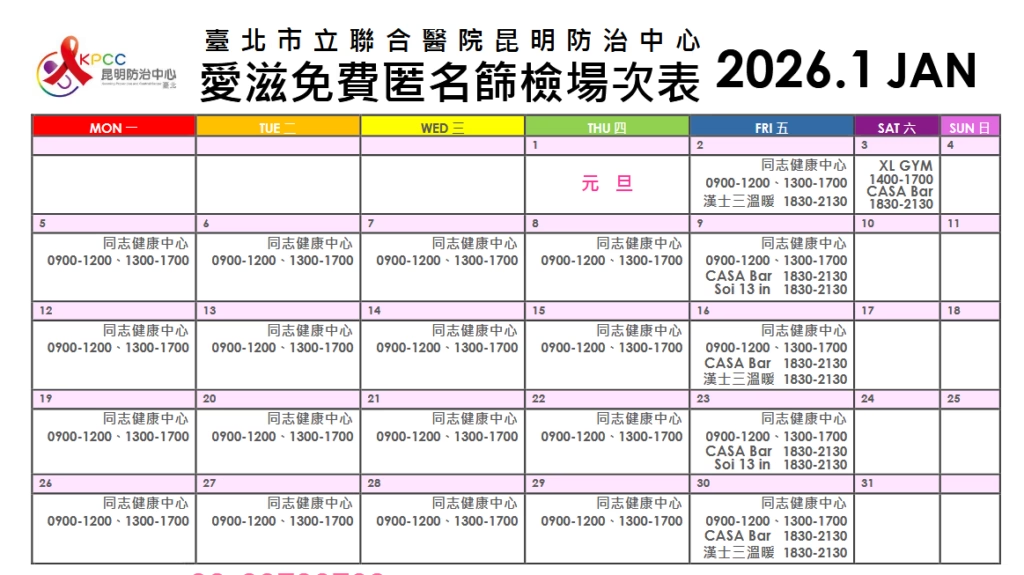
There is also free anonymous testing (blood tests – takes a week or two to get the results) held around Taipei as follows:
These timetables are updated every month, you can find them here.
The most commonly occurring locations have been listed below:
Gay Health Center (同志健康中心), 5F, No. 100 Kunming Street, Wanhua District, Taipei (臺北市萬華區昆明街100號5樓) Note: This option is by appointment only
Casa Bar No. 57, Lane 10, Chengdu Rd, Wanhua District, Taipei City
Mudan (紅樓(牡丹))(bar at the Red House drinking area in Ximen)
Soi 13 1 No. 13 Minsheng East Road Sect 1, Zhongshan Dist. Taipei (1, No. 13號民生東路一段中山區台北市104)
XL Club 4F, No. 10 Minzu East Road, Zhongshan Dist. Taipei (4樓, No. 10號民族東路中山區台北市10491)
Taipei Men Center (城男舊事心驛站) 3F, No. 5, Alley 199, Dunhua North Road, Songshan Dist. Taipei (105台北市松山區敦化北路199巷5號 3樓)
Han Sauna (漢士三溫暖) 8F, No. 70 Xining South Road, Wanhua Dist. Taipei (108台北市萬華區西寧南路70號8 樓)
Note: 「人力調度,篩檢暫停」 means that due to personnel adjustments, screening is suspended.
If the result turns out positive, there are several avenues to pursue treatment. Dr. Stephane Ku (顧文瑋) does consultations at Taipei Veterans General Hospital on Wednesday evenings (感染科), where you can get tested, explore the possibility of going on prep or get treatment.
If your partner is living with HIV, you may also qualify for a new government PREP program, which allows 30 pills per month for the female spouses/partners of people living with HIV and 20 pills per 3 months for the male spouses/partners under 35 years old of people living with HIV.
In a previous post I talked about how you can order and pay for masks online using an e-reader and your NHI card. You can also pay your taxes using your NHI card. If you ordered masks using the system, you’ve already set up your NHI card for use and you can skip this post. If you didn’t you’ll need an ATM-style card reader and some patience.
(Note: If you’re about to renew your ARC, plan to do your taxes before the renewal or after, as your details may not be accepted while your renewal is being processed, according to NihaosItGoing.)
(You can also use your Alien Citizen Digital Certificate if you have one, and the process will be exactly the same except you will be asked to enter your pin).
After you’ve installed the card reader, head to their website, if you’re a Windows user, you’ll need to download their Windows installer, or MAC Installer, (others available here). You can check if your card is being read properly here.
If it’s working, you should get a message like this:
You’ll also have to mark your server as a trusted server on this page). You’ll have to be an administrator on your computer to do this.
First-time users should click the box labeled 「首次登入請先申請」(First-time users, please apply here first), which I’ve marked with a red box below:
(Note they’ve now added English to the website too.)
This will take you to a list of terms that you can click agree on:
At the minute it seems like the NHI have added an extra security precaution so that you have to enter your 「戶號」. However, if you press 「讀卡」 (read card) on this screen, it should take you to the page below, where you’re prompted to fill in your ARC details (on an ARC owned by the Vietnamese spouse of a Taiwanese person apparently):
That should take you to a screen like this where you set your password:
After this you’ll have to confirm your email address:
Expect to get quite frustrated with your card reader throughout this process.
Once you’ve registered your email, and verified it and set your password you’re ready to use your NHI card for to file your taxes.
File Offline Then Upload (PC Windows Users Have to Choose This)
And click the turquoise button to file your taxes offline and then upload them or the dark blue button (Web線上版) to file your taxes online.
If you chose offline, you’ll get a program downloaded on to your computer. Once you open it, you get asked if you want to proceed in English or Chinese. The advantages of English is that it’s quicker to read, but the advantages of Chinese is that it matches all the jargon on your documents:
Then it will check a few more things and you can just click 「確認」 or “Confirm”. It will also ask you if you want to check for the latest version. Unless you already had it on your computer, you can just say “no” and proceed at this point.
Next it will ask you what year you want to file for – this should be 108 or 2019, depending on format and you should choose Taxpayer.
The next screen will ask you how you want to login. (You can login with just your ARC number, but this means that you’ll have to enter all the data yourself.) So if you’ve got your card-reader fired up, stick in your NHI card and choose NHI card and password:
Next you’ll be prompted to enter your ARC number. After that the following screen will up and you should choose the first option (to download info on tax withholding and deductions):
(If you just have your ARC, you can click 6 here and begin entering your data manually.)
For those with card readers and NHI cards, you’ll be prompted to enter a password. This is the password that you used when setting up your NHI account above. (It’s also the password you have to enter on your NHI app every time you login:
You’ll get a few more intermediary screens saying that the info is just for reference. Including two report previews which you can read and then close to proceed.
You’ll then get to the list of deductions and the withholding information, which should look something like this, but with data filled in:
This is a list of all your income, including salary and bank interest, and below is a list of different kinds of deductions. If you’re satisfied you can select all and confirm.
Now you come to the tax form proper:
You should see your income info and refund listed in the top right corner. The rest of the information you’ll have to fill out yourself.
The next sections are reasonably straightforward, and most of the info is auto-filled or blank. Unless you have a spouse and are filing together or dependents.
You can go for itemized deductions if your itemized deduction is above NT$120,000, which is the standard deduction, on the deduction page.
If you’re on your way to your APRC, make sure to print the statement, here. As you’ll have to mail in a copy to get your certificate:
Next you pick how you’ll get your refund and if you want to apply for the tax statement, make sure to tick the box:
You can choose check or bank transfer, I suggest the latter (you’ll have to fill out your bank identifier number and your account number then you can “Upload filing data”.
Remember to print the docs or save them to print later, if you want to apply for a tax certificate. You’ll have to mail a copy of your tax filing and then the certificate will be mailed to you!
File Online (Mac and Linux Users)
If you chose online, it should take you to this screen and you can choose the NHI Health Card and password option:
If you’ve got everything set up and you get this message:
This is because you’re using a Windows system, so you’ll need to use the offline method described above.
There is a message in Chinese saying that they’ve updated the systems on May 10 (the future), so you need to download the new component. Maybe this will change the game in terms of Windows users? *shrugs*
So I used the online system successfully on a Mac this evening:
After this it is essentially the same process as the offline version for Windows.





 Do you want your Alien Citizen Digital Certificate to hold all your receipts online so you don’t have to check them every two months (except the old ones that change colour every two months)? You can also get your winnings from the receipt lottery deposited directly in your bank account.